


Keep your business emails flowing with SMTP service
Set it up once and send unlimited bulk and transactional emails straight from the tools you already use.


Power your email campaigns with bulk SMTP
Send promotions, newsletters, and announcements to your entire contact list or targeted segments without switching tools. Simply copy SMTP credentials from your SendPulse account and add them to your on-premises or cloud app.
Handle high sending volumes with ease. Send thousands of emails every hour without the sending limits of Gmail or your web hosting provider.
Help your campaign reach subscribers’ inboxes thanks to clean IP addresses with SPF, DKIM, and DMARC authentication.

Mail critical messages instantly with transactional SMTP
Deliver confirmations, password reset emails, receipts, and order updates the moment they're needed. No matter how many emails you send, customers always receive time-sensitive updates right away.
Transactional email traffic is isolated from bulk emails, so your most important messages always get priority.
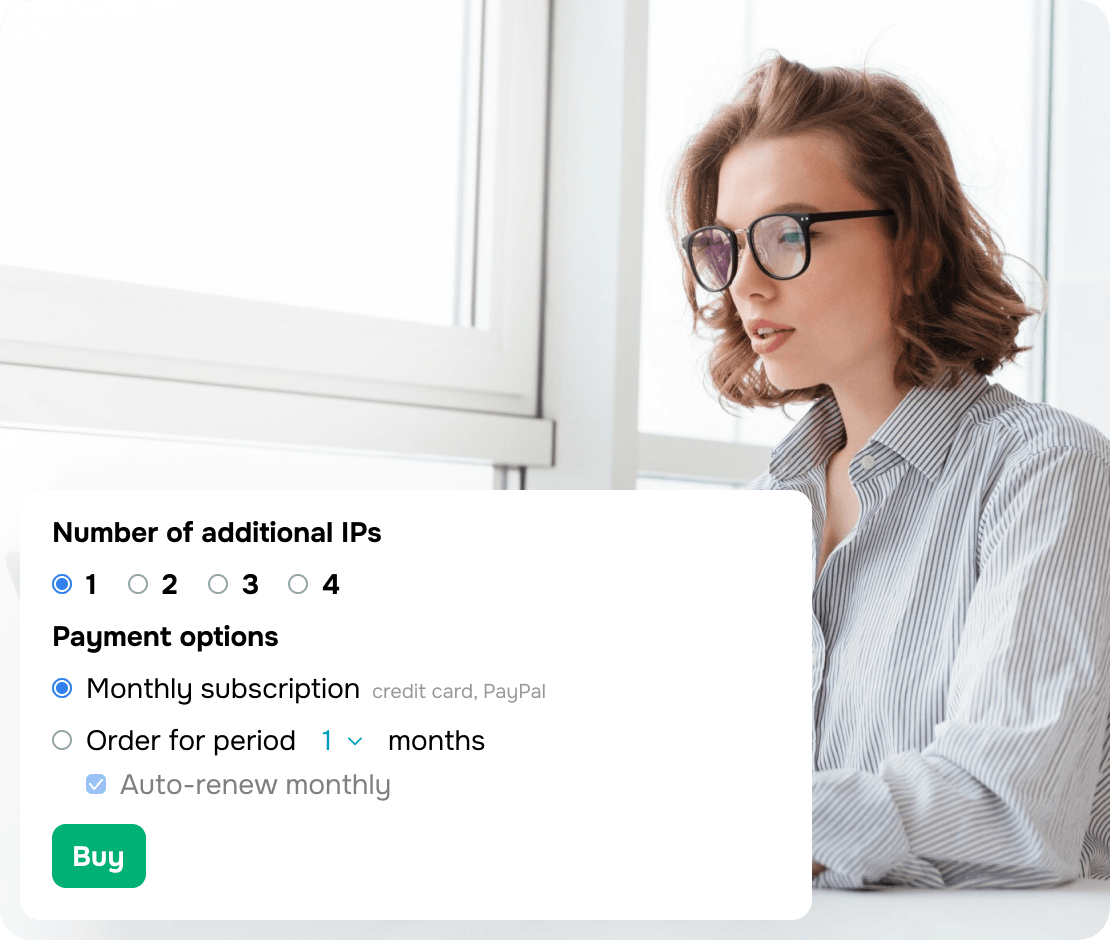
Strengthen your sender reputation with a dedicated IP address
Keep your sender reputation in your own hands. Unlike shared IPs, where another sender's actions can impact your deliverability, a dedicated IP is used exclusively for your email.
Included with plans starting at 100,000 emails per month or available as an add-on, a dedicated IP is an ideal choice for high-volume senders looking to build and maintain a strong sender reputation.


Enjoy unlimited sending as you grow
Forget restrictive daily sending limits. SendPulse increases your hourly sending capacity as you upgrade, from 50 to 20,000 emails per hour.
You can choose a monthly plan or pay as you go. Start with 12,000 free emails every month and scale from thousands to millions of emails as your business grows.
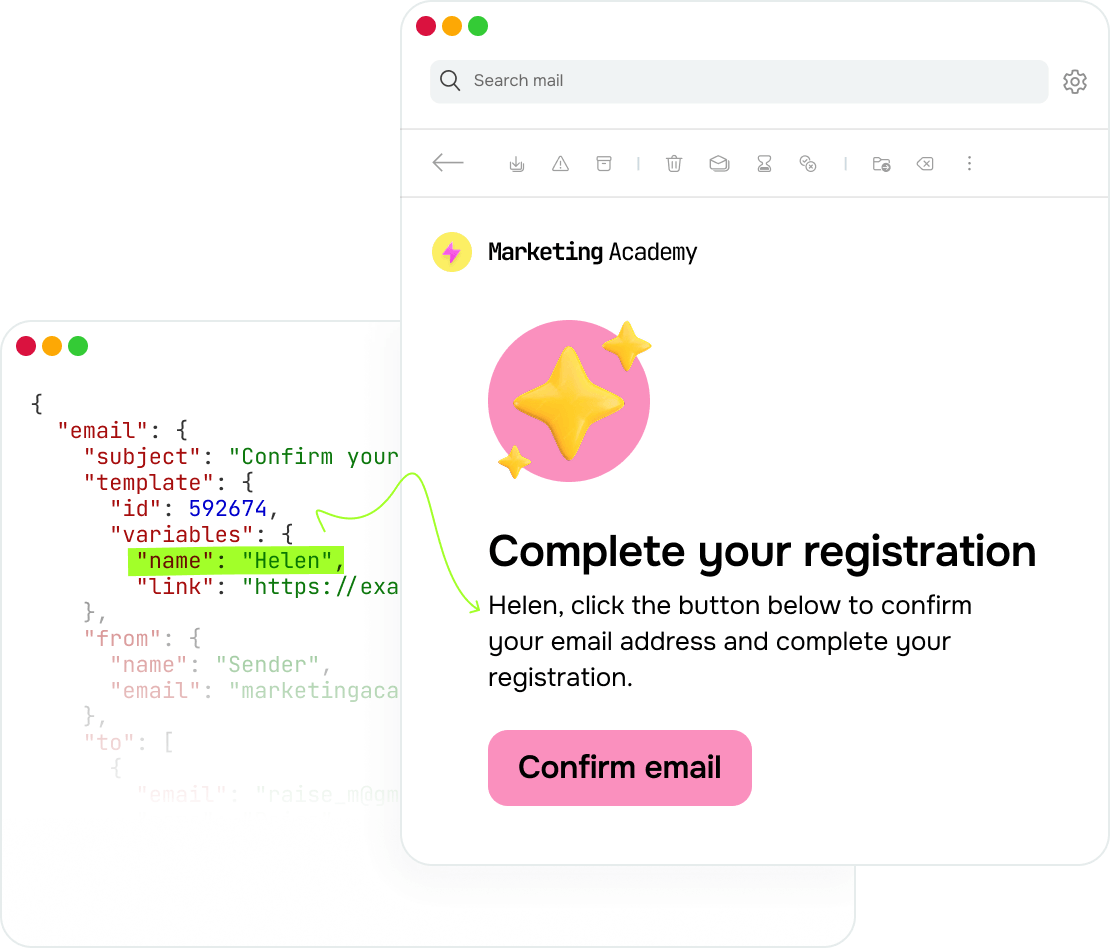
Turn one template into thousands of customized emails
Design email templates from scratch using our visual email builder. Start with a ready-made layout or upload your own HTML. Then, tailor every message using dynamic variables, like the recipient's name, a unique payment link, and order number.
Pre-built eCommerce templates help you automate abandoned cart emails, order confirmations, shipping notifications, and post-purchase feedback. Set them up once and send the right email automatically when customers take action.
Track your SMTP campaign performance with ease
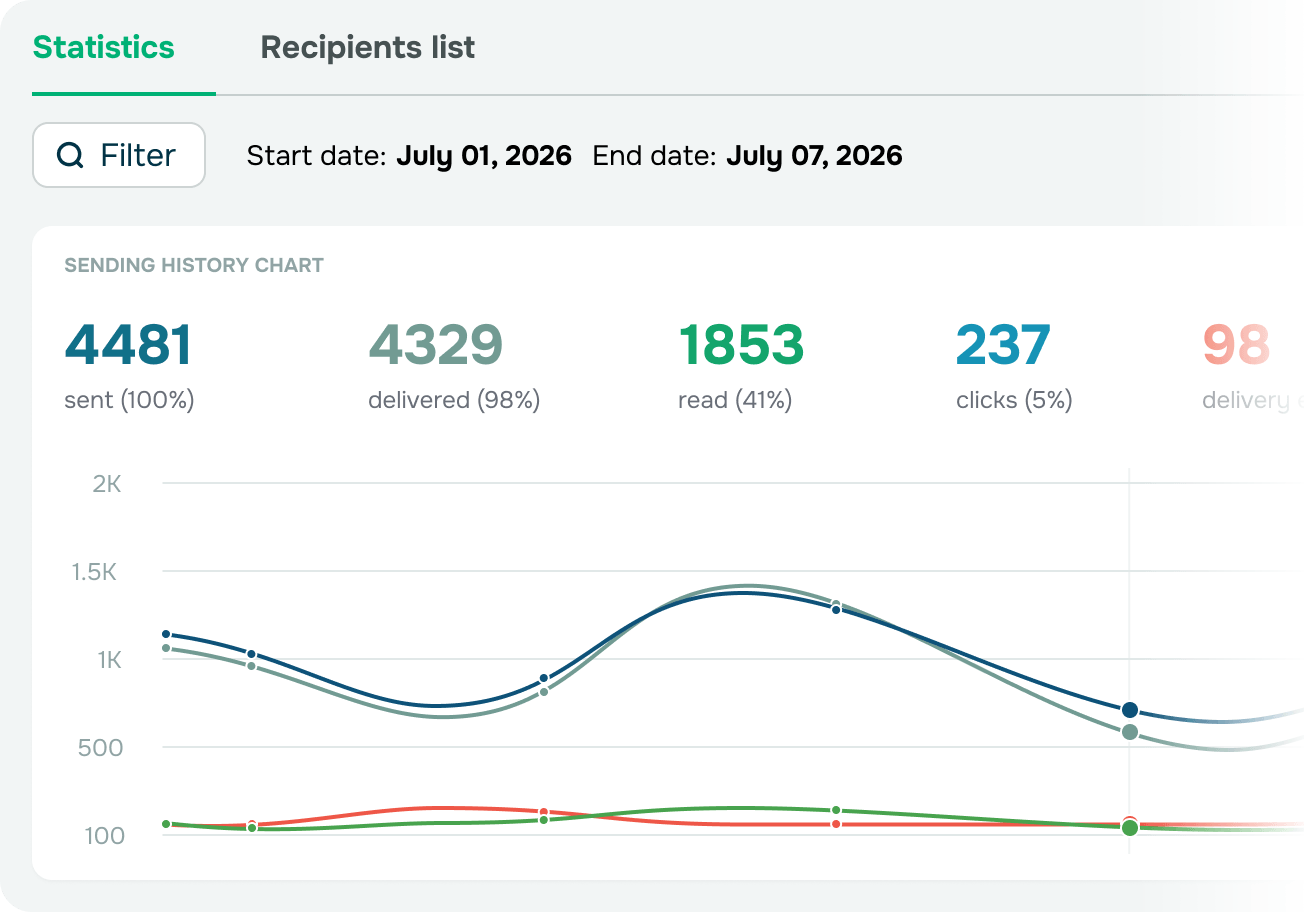
Monitor your email KPI

Emails sent and delivered

Open rate

Click-through rate

Delivery errors
Stay ahead of delivery issues
Analyze delivery and bounce history to spot outdated or invalid email addresses and maintain a healthy mailing list. Automatically exclude unsubscribed recipients from future campaigns to protect your sender reputation and boost deliverability.
Export data anytime
Export bounced and unsubscribed email address lists as CSV files for reporting, analysis, or use across your tech stack. Use your data wherever you prefer — you’re never limited to your SendPulse account.
Pair SMTP with your system in minutes
Find everything you need to set up your SMTP server, explore available commands, and track email performance in a single workspace.

WordPress website
Send order notifications, form submission confirmations, and other automated messages using MailPoet, WP Mail SMTP, or Easy WP SMTP with no coding.
Learn more
Email client
Use your SendPulse SMTP credentials to seamlessly set up Outlook, Thunderbird, or any compatible email client.
Learn moreBuild smarter integrations with developer tools and AI agents
PHPMailer and language libraries
Add SMTP emails to your project with PHPMailer or ready-to-use libraries for PHP, Python, Node.js, and other programming languages.
Learn moreSMTP Service API
Streamline your email workflows through the REST API. Send emails, track performance, manage suppression lists, and configure sender email addresses with complete control.
Browse API documentationMCP server
Integrate SMTP with Claude, ChatGPT, or Cursor through SendPulse’s MCP server and let your AI agents send emails, analyze key metrics, and manage mailing lists for you.
Learn moreCustom integrations
Create custom SMTP workflows for your application or AI agent using cloud-based MCP with flexible permissions and tool access.
Learn more
<?php

use Sendpulse\RestApi\ApiClient;
use Sendpulse\RestApi\Storage\FileStorage;

$smtpSendMailResult = (new ApiClient('MY_API_ID', 'MY_API_SECRET', new FileStorage()))->post('smtp/emails', [
    'email' => [
        'html' => base64_encode('<p>Hello!</p>'),
        'text' => 'text',
        'subject' => 'Mail subject',
        'from' => ['name' => 'API package test', 'email' => 'from@test.com'],
        'to' => [['name' => 'to', 'email' => 'to@test.com']],
        'attachments_binary' => [
            'attach_image.jpg' => base64_encode(file_get_contents('../storage/attach_image.jpg'))
        ]
    ]]);

var_dump($smtpSendMailResult);
?>
sample.php hosted with ❤ by
github.com/sendpulse/sendpulse-rest-api-php
# SendPulse's Ruby Library: https://github.com/sendpulse/sendpulse-rest-api-ruby
require './api/sendpulse_api'
sendpulse_api = SendpulseApi.new(API_CLIENT_ID, API_CLIENT_SECRET, API_PROTOCOL, API_TOKEN)

email = {
 html: '<p>Your email content goes here<p>',
 text: 'Your email text version goes here',
 subject: 'Testing SendPulse API',
 from: { name: 'Your Sender Name', email: 'your-sender-email@gmail.com' },
 to: [
  {
   name: "Subscriber's name",
   email: 'subscriber@gmail.com'
  }
 ]
}

sendpulse_api.smtp_send_mail(email)
sample.rb hosted with ❤ by
github.com/sendpulse/sendpulse-rest-api-ruby
# SendPulse's Python Library: https://github.com/sendpulse/sendpulse-rest-api-python
from pysendpulse import PySendPulse
if __name__ == "__main__":
    TOKEN_STORAGE = 'memcached'
    SPApiProxy = PySendPulse(REST_API_ID, REST_API_SECRET, TOKEN_STORAGE)
    email = {
        'subject': 'This is the test task from REST API',
        'html': '<p>This is a test task from https://sendpulse.com/api REST API!<p>',
        'text': 'This is a test task from https://sendpulse.com/api REST API!',
        'from': {'name': 'John Doe', 'email': 'john.doe@example.com'},
        'to': [
            {'name': 'Jane Roe', 'email': 'jane.roe@example.com'}
        ]
    }
    SPApiProxy.smtp_send_mail(email)
sample.py hosted with ❤ by
github.com/sendpulse/sendpulse-rest-api-python
// SendPulse's Java Library https://github.com/sendpulse/sendpulse-rest-api-java
import com.sendpulse.restapi.Sendpulse;
import java.util.ArrayList;
import java.util.HashMap;
import java.util.Map;

public class Example {
    public static void main(String[] args) {
        Sendpulse sendpulse = new Sendpulse(API_CLIENT_ID, API_CLIENT_SECRET);
        Map<String, Object> from = new HashMap<String, Object>();
        from.put("name", "Your Sender Name");
        from.put("email", "your-sender-email@gmail.com");

        ArrayList<Map> to = new ArrayList<Map>();
        Map<String, Object> elementto = new HashMap<String, Object>();
        elementto.put("name", "Subscriber's name");
        elementto.put("email", "subscriber@gmail.com");
        to.add(elementto);

        Map<String, Object> emaildata = new HashMap<String, Object>();
        emaildata.put("html","Your email content goes here");
        emaildata.put("text","Your email text version goes here");
        emaildata.put("subject","Testing SendPulse API");
        emaildata.put("from",from);
        emaildata.put("to",to);

        Map<String, Object> result = (Map<String, Object>) sendpulse.smtpSendMail(emaildata);
        System.out.println("Result: " + result);
    }
}
sample.java hosted with ❤ by
github.com/sendpulse/sendpulse-rest-api-java
// SendPulse's Node.JS Library: https://github.com/sendpulse/sendpulse-rest-api-node.js
var sendpulse = require("./api/sendpulse.js");
sendpulse.init(API_USER_ID, API_SECRET, TOKEN_STORAGE);

var email = {
  "html" : "<p>Your email content goes here</p>",
  "text" : "Your email text version goes here",
  "subject" : "Testing SendPulse API",
  "from" : {
    "name" : "Your Sender Name",
    "email" : "your-sender-email@gmail.com"
  },
  "to" : [ {
    "name" : "Subscriber's name",
    "email" : "subscriber@gmail.com"
  } ]
};

var answerGetter = function answerGetter(data){
    console.log(data);
}

sendpulse.smtpSendMail(answerGetter, email);
sample.js hosted with ❤ by
github.com/sendpulse/sendpulse-rest-api-node.js
#import "Sendpulse.h" // SendPulse's Obj-C Library https://github.com/sendpulse/sendpulse-rest-api-objective-c

- (void)viewDidLoad {
    [super viewDidLoad];
    [[NSNotificationCenter defaultCenter] addObserver:self selector:@selector(doSomethingWithTheData:) name:@"SendPulseNotification" object:nil];

    Sendpulse* sendpulse = [[Sendpulse alloc] initWithUserIdandSecret:userId :secret];

    NSDictionary *from = [NSDictionary dictionaryWithObjectsAndKeys:@"Your Sender Name", @"name", @"your-sender-email@gmail.com", @"email", nil];

    NSMutableArray* to = [[NSMutableArray alloc] initWithObjects:[NSDictionary dictionaryWithObjectsAndKeys:@"Subscriber's name", @"name", @"subscriber@gmail.com", @"email", nil], nil];

    NSMutableDictionary *emaildata = [NSMutableDictionary dictionaryWithObjectsAndKeys:@"<b>Your email content goes here</b>", @"html", @"Your email text version goes here", @"text",@"Testing SendPulse API",@"subject",from,@"from",to,@"to", nil];

    [sendpulse smtpSendMail:emaildata];
}

- (void)doSomethingWithTheData:(NSNotification *)notification {
    NSMutableDictionary * result = [[notification userInfo] objectForKey:@"SendPulseData"];
    NSLog(@"Result: %@", result);
}
sample.m hosted with ❤ by
github.com/sendpulse/sendpulse-rest-api-objective-cGet started with a free SMTP service that never expires
Enjoy your free SMTP server with no expiration date, hidden fees, or feature limitations.

Start with 12,000 free emails every month
Get started at no cost and scale at your own pace. Upgrade to a paid plan when you need higher sending volumes or a dedicated IP address.

Integrate SMTP with your preferred tools
Pair SMTP with your CMS, CRM, app, or any other system without changing your workflow.

Keep your emails out of spam
Set up DKIM, SPF, and DMARC authentication to verify your sender identity and boost email deliverability.

Act on every email event
Track delivery updates and recipient activity, then use these events to trigger custom workflows. One way to use this is to automatically clean your mailing list after bounced emails.

Manage unsubscribes on autopilot
No more manual mailing list cleanups. SendPulse automatically excludes unsubscribed recipients from future email campaigns, even if their email addresses remain in your mailing list.

Split email traffic across two domains
Leverage two sender domains from day one. Use dedicated domains for transactional and marketing emails to protect your primary domain's reputation.
A cheap SMTP service that scales with your business
Start sending for free, then upgrade to a paid plan when your business needs higher sending speeds or advanced features like a dedicated IP address. With flexible subscription and pay-as-you-go pricing, our SMTP service is built to fit businesses of any size.
Put SMTP to work for your business
Build practical marketing and notification workflows for every use case.

SMTP for email marketing
Power your email marketing with SMTP and run high-volume email campaigns right from your CMS or CRM, helping you:
- Drive sales using product recommendations and special offers
- Keep students in the loop of new courses and learning opportunities
- Grow reader loyalty with regular newsletters and content updates
Design pro-level emails with customizable templates or create your own from scratch using a drag-and-drop editor — no coding required.
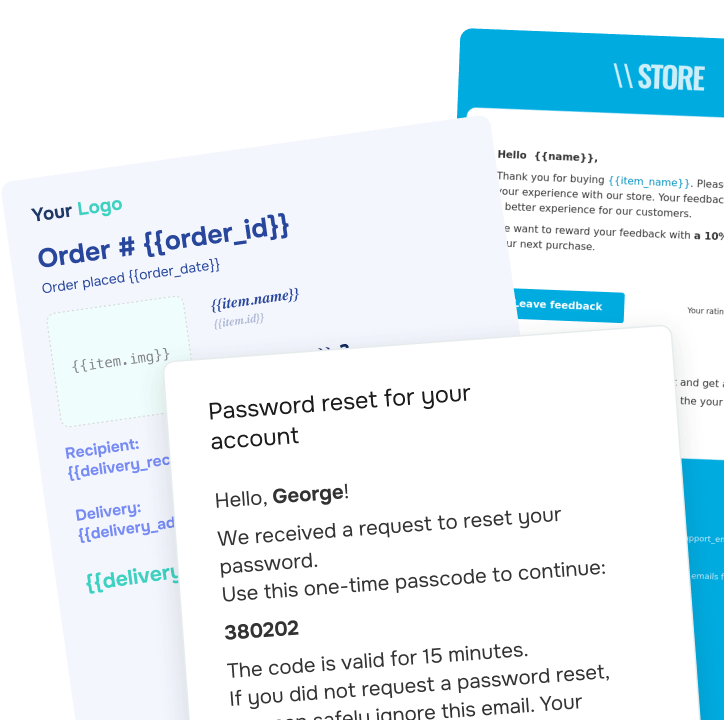
SMTP for transactional emails
Automatically deliver transactional emails whenever a customer takes action:
- Confirm purchases and share shipping updates with your customers
- Help users securely access their accounts thanks to registration and password reset emails
- Send course invitations, login credentials, and completion certificates to your students
All emails are sent through European data centers using SSL encryption to keep sensitive information secure.
FAQ
What is an SMTP server?
The Simple Mail Transfer Protocol is a method of exchanging information between a sender’s and a recipient’s servers. You can use the SendPulse SMTP server to send HTML emails without trying our other services and features.
Why should I use an SMTP server?
An SMTP server allows you to send all sorts of transactional emails, e.g., confirmation emails, abandoned cart emails, shipping updates, notifications, etc. SendPulse’s SMTP server is reliable and has a high deliverability rate and sender reputation.
How can I set up an SMTP server?
You need to register with SendPulse, fill in a simple form, and set up your authentication parameters. Follow the prompts, and remember that our customer support team is always here to help.
How much does it cost to use an SMTP server?
With SendPulse, you can send up to 12,000 emails for free each month. If you want to send more emails via our SMTP server, you need to choose between our monthly subscription plans and pay-as-you go plans. Learn more about our SMTP server pricing here.
Integrate email campaigns into your project right now
Send transactional emails instantly via SMTP or API with exceptional deliverability
Try it now12,000 emails per month for free
or