Run a flow when a user joins your Telegram group or channel
In Telegram chatbots, you can automatically run flows when a user joins your group or channel. This helps you welcome new members, share community guidelines, collect data, or point them to your chatbot’s key commands.
In this article, we will talk about how the Join a Telegram group or channel trigger works and how to set it up.
You can use the Welcome message, Standard reply, and Unsubscription from the bot standard triggers in any chatbot. To create your own triggers, use keywords and Automation 360 events.
Benefits and use cases
With the Join a Telegram group or channel trigger, you can do the following:
- send new members a welcome message and your community guidelines;
- collect information from new members;
- point new members to your chatbot's key commands;
- approve join requests only from users who meet your conditions.
Here's how businesses can use this trigger:
- Onboarding new members. If you run a private channel, your chatbot can send the community rules when someone requests to join. After the user replies, your chatbot approves the request.
- Course cohorts. If you run a group for each course stream, your chatbot can approve join requests only from enrolled students.
- Paid communities. If you grant paid access to a private group, your chatbot can check the user's subscription before approving the request.
Getting started
Before you set up the trigger, add your chatbot as an admin of your group or channel. To receive and approve join requests, your chatbot needs Add Subscribers in a channel, or Invite Users via Link or Add Members in a group. Without this permission, your chatbot doesn't get join requests. Learn more in the Telegram documentation: ChatJoinRequest.
Read more: Add your chatbot to a Telegram channel or group.
Create a trigger
Go to your Telegram bot, and click Create a new trigger in the list of triggers on the left.
Select the Join a Telegram group or channel checkbox in the trigger settings, and choose the group or channel with your chatbot.
Chatbot trigger behavior varies across public and private groups or channels. In public groups and channels, your chatbot can only send messages to its subscribers.
To allow your chatbot to send messages to non-subscribers, enable the Approve new members option for invite links in a private channel or group. Click your group or channel name, then select Edit. Go to Invite Links, create a link, and turn on the Approve new members toggle.
This option enables your chatbot to respond to users when they request to join a group or channel. However, users only become chatbot subscribers when they send a message or click a quick reply button. Clicking buttons in the first message will not continue your flow.
If you haven't added your chatbot to your group yet, click Add to a group. Afterward, you will be redirected to Telegram, where you can select a group or channel and add your chatbot there.
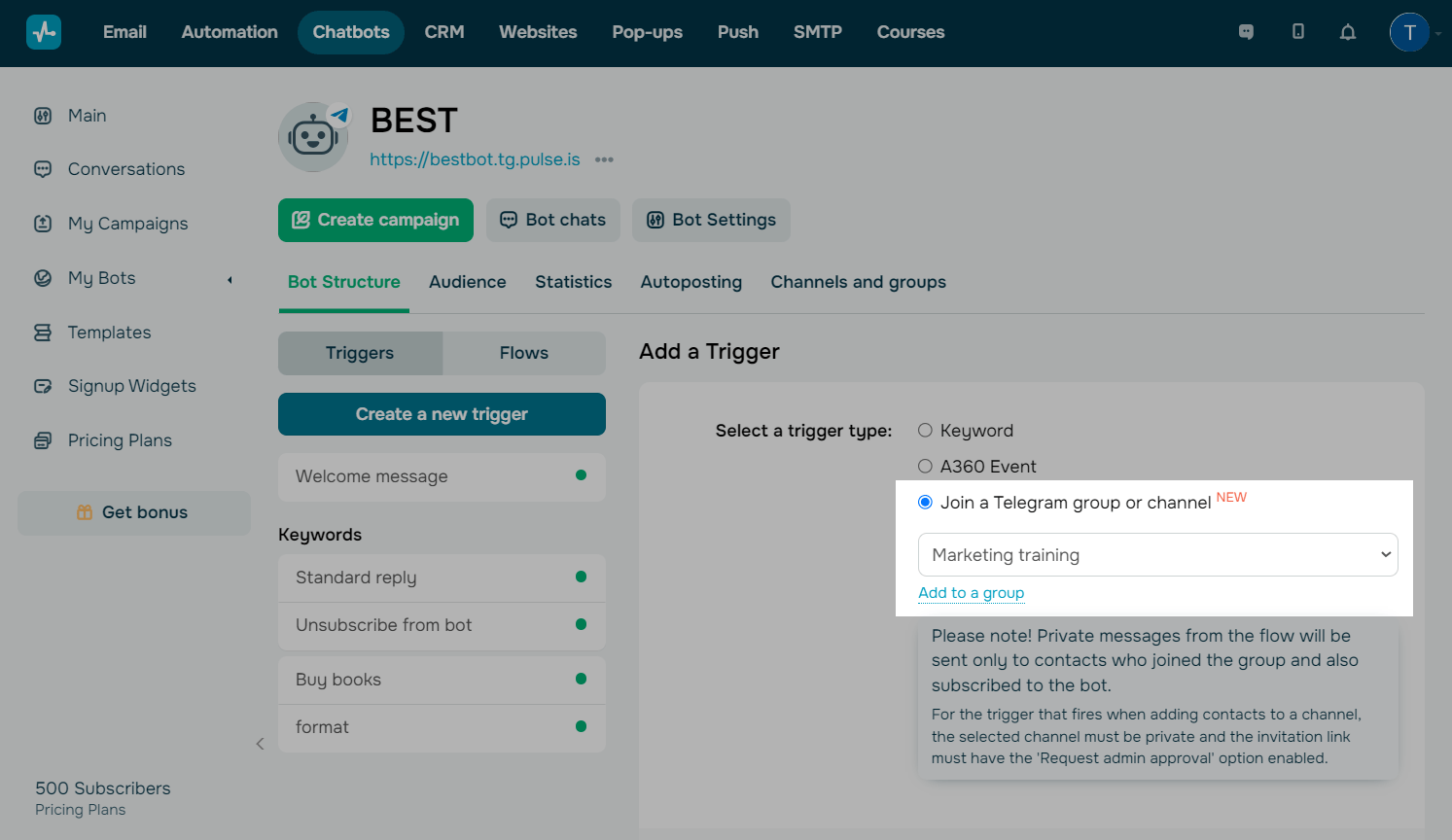
Click Add to save the trigger.
Set up a flow
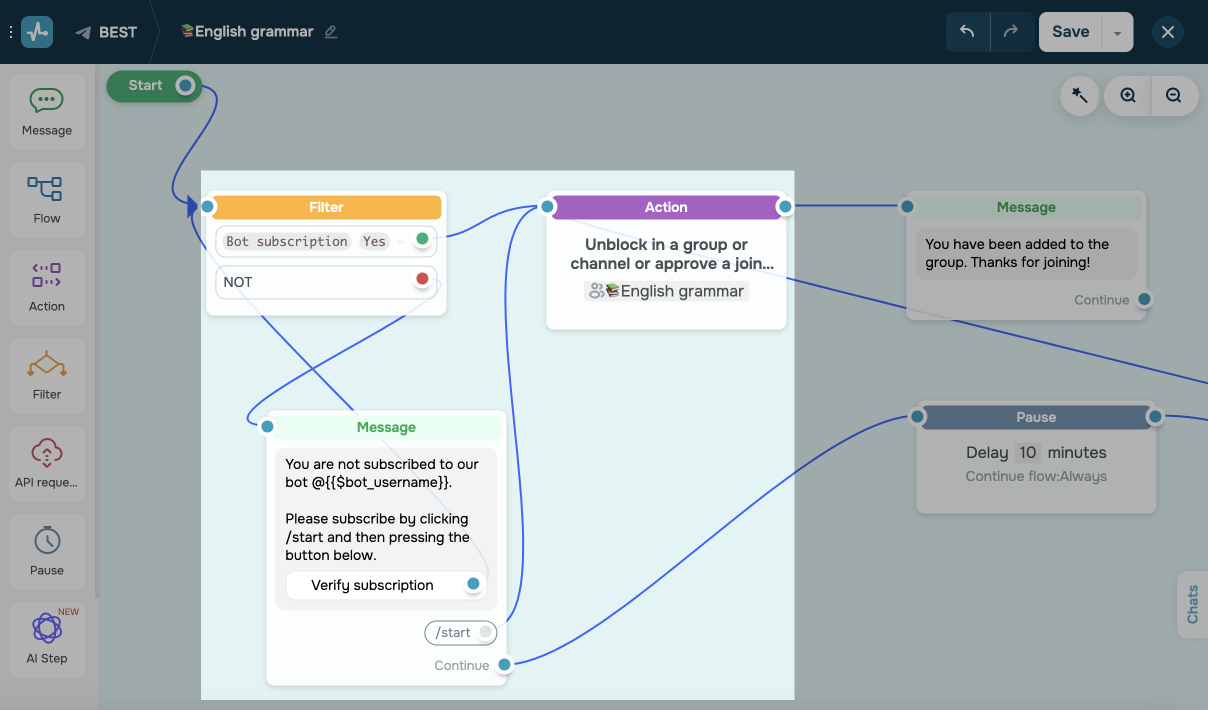
At the start of your flow, you will see the Filter element with the Subscription to the bot condition. Next, there is the Action element with the Unblock in a group or channel or accept a join request command.
The Message element includes an invitation to join a group or channel for users who aren't subscribed to your chatbot. This setup ensures that only those who have paid for chatbot access can enter your group chat.
If the filter conditions match and the user is a chatbot subscriber, the corresponding Message element is added next.
You can add more elements and commands based on your scenario. For example, you can filter not only chatbot subscribers but also group members.
Read more: How to use chatbot builder elements.
 Last Updated: 25.11.2025


or